· 7 min read
Zero-Trust Kubernetes: Architecting Micro-Segmented Security Boundaries
Zero trust in Kubernetes: default-deny NetworkPolicies that actually work, Istio mTLS with identity-based authorization, least-privilege RBAC, and pitfalls.
The Problem
Kubernetes networking is permissive by default. Unless a NetworkPolicy selects a pod, that pod is non-isolated: it accepts traffic from, and can send traffic to, any other pod in the cluster. That default helps teams move quickly. It also means one compromised container can reach the payments API, the database and anything else with a cluster IP.
Many incident write-ups follow the same pattern. An attacker gets code execution in a low-value, internet-facing pod, for example through a vulnerable dependency in a frontend. From there they scan the flat pod network, reuse the auto-mounted service account token against the Kubernetes API, and move laterally to high-value workloads. None of these steps needs a sophisticated exploit. Each relies on implicit trust.
The Architectural Solution
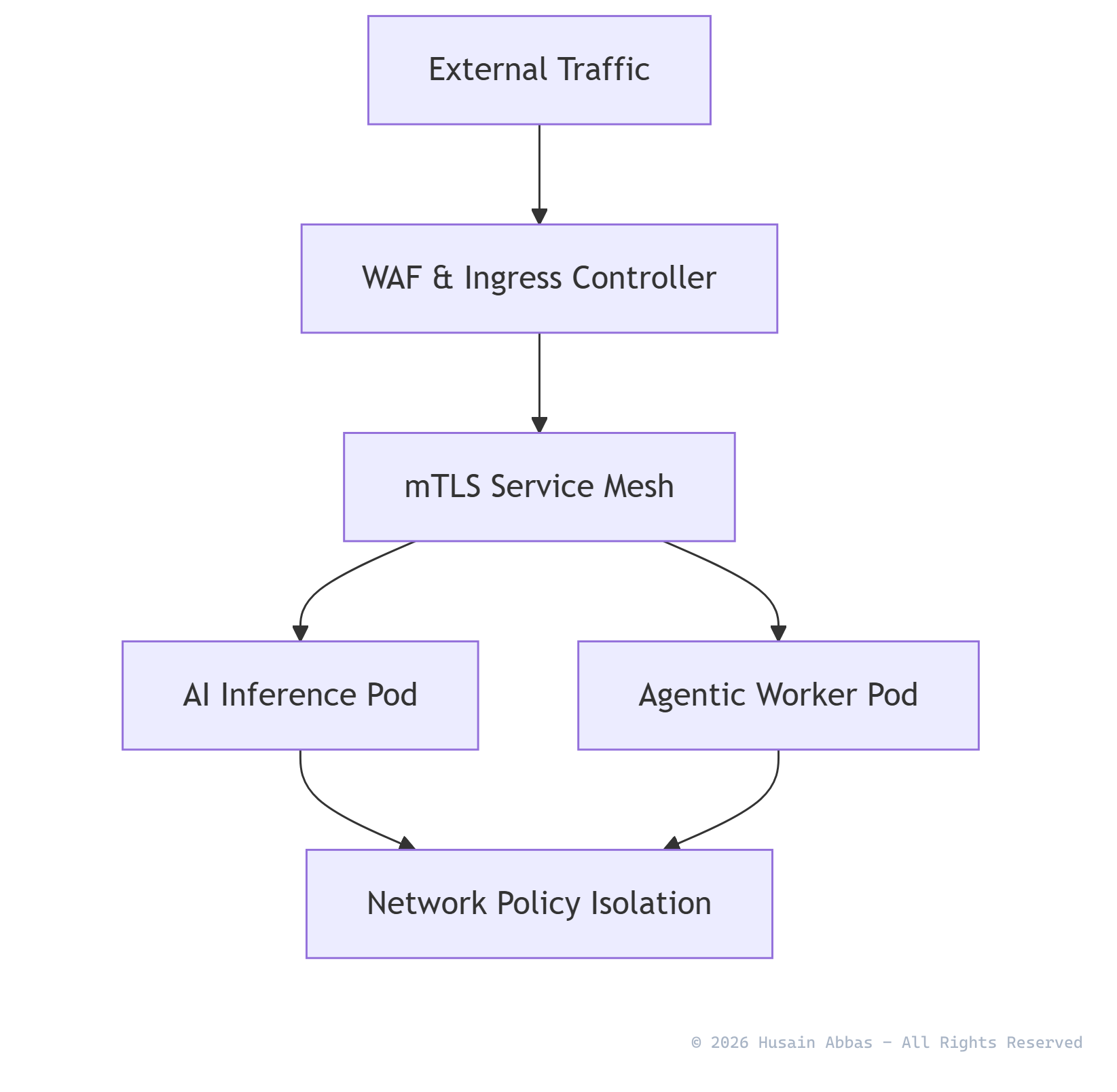
Zero trust, as defined in NIST SP 800-207, removes implicit trust based on network location. Every request is authenticated, authorised and encrypted, whether it comes from outside or inside the cluster. NIST SP 800-207A applies this to cloud-native systems and recommends identity-based policies that service meshes can enforce. In Kubernetes, that becomes three complementary layers:
- L3/L4 micro-segmentation (NetworkPolicy). Each namespace starts from default deny, and every permitted flow is allowed explicitly by pod label, namespace and port. NetworkPolicy is enforced by the CNI plugin, so it works even if a workload’s proxy is bypassed.
- Workload identity and encryption (service mesh). A mesh such as Istio or Linkerd issues each workload a cryptographic identity derived from its service account, and Istio uses the SPIFFE format. All pod-to-pod traffic uses mutual TLS (mTLS). Authorisation is then written against who is calling, not which IP they happen to have.
- Least-privilege control-plane access (RBAC). Workloads run under dedicated service accounts with only the API permissions they need. Most need none, so token auto-mounting is turned off.
The layers cover each other’s gaps. NetworkPolicy cannot do TLS or identity. The mesh cannot stop a pod that bypasses or lacks a proxy. RBAC protects the API server, which neither of the other layers governs.
Architecture Diagram
Core Implementation
Layer 1: Default Deny That Actually Works
Many examples show a default-deny policy followed by a single ingress rule for the database, and then wonder why the frontend still cannot connect. The Kubernetes documentation is explicit. When egress is also isolated, both the source pod’s egress policy and the destination pod’s ingress policy must allow the connection. A default-deny egress policy also blocks DNS.
# 1. Deny all ingress and egress for every pod in the namespace
apiVersion: networking.k8s.io/v1
kind: NetworkPolicy
metadata:
  name: default-deny-all
  namespace: secure-production
spec:
  podSelector: {}
  policyTypes: [Ingress, Egress]
---
# 2. Allow DNS lookups to CoreDNS for every pod in the namespace
apiVersion: networking.k8s.io/v1
kind: NetworkPolicy
metadata:
  name: allow-dns-egress
  namespace: secure-production
spec:
  podSelector: {}
  policyTypes: [Egress]
  egress:
    - to:
        - namespaceSelector:
            matchLabels:
              kubernetes.io/metadata.name: kube-system
          podSelector:
            matchLabels:
              k8s-app: kube-dns
      ports:
        - { protocol: UDP, port: 53 }
        - { protocol: TCP, port: 53 }
---
# 3a. Database accepts PostgreSQL only from the frontend
apiVersion: networking.k8s.io/v1
kind: NetworkPolicy
metadata:
  name: db-ingress-from-frontend
  namespace: secure-production
spec:
  podSelector:
    matchLabels: { app: backend-database }
  policyTypes: [Ingress]
  ingress:
    - from:
        - podSelector:
            matchLabels: { app: frontend-web }
      ports:
        - { protocol: TCP, port: 5432 }
---
# 3b. Frontend may open connections to the database (the half most examples forget)
apiVersion: networking.k8s.io/v1
kind: NetworkPolicy
metadata:
  name: frontend-egress-to-db
  namespace: secure-production
spec:
  podSelector:
    matchLabels: { app: frontend-web }
  policyTypes: [Egress]
  egress:
    - to:
        - podSelector:
            matchLabels: { app: backend-database }
      ports:
        - { protocol: TCP, port: 5432 }
In policy 2, namespaceSelector and podSelector sit in the same list element, so both must match (an AND). Splitting them into two elements would mean “anything in kube-system OR any kube-dns pod”, which is a subtle and common mistake. The kubernetes.io/metadata.name label is set automatically on every namespace. The k8s-app: kube-dns label is the CoreDNS convention in most distributions, so check yours.
Layer 2: Identity-Based Authorisation with Istio
With a mesh in place, require mTLS for the namespace and authorise by service-account identity rather than by label or IP:
apiVersion: security.istio.io/v1
kind: PeerAuthentication
metadata:
  name: default
  namespace: secure-production
spec:
  mtls:
    mode: STRICT          # reject plaintext from non-mesh clients
---
apiVersion: security.istio.io/v1
kind: AuthorizationPolicy
metadata:
  name: db-allow-frontend-identity
  namespace: secure-production
spec:
  selector:
    matchLabels:
      app: backend-database
  action: ALLOW           # once any ALLOW policy selects a workload, other traffic is denied
  rules:
    - from:
        - source:
            principals: ["cluster.local/ns/secure-production/sa/frontend-web"]
      to:
        - operation:
            ports: ["5432"]
A pod labelled app: frontend-web but running under a different service account would pass the NetworkPolicy and still be refused by the mesh. That is the practical difference between network location and identity. For HTTP services, the same policy type can also match methods and paths. This is where Layer 7 least privilege lives.
Layer 3: Least-Privilege RBAC
Set automountServiceAccountToken: false on service accounts and pods that do not call the Kubernetes API. That covers most application workloads. For those that do, bind namespaced Roles with specific verbs and resources. Avoid wildcards and cluster-wide bindings, and follow the Kubernetes RBAC good practices. Pay particular attention to permissions that allow privilege escalation, such as creating pods, reading secrets and impersonation.
Edge Cases & Limitations
-
Your CNI must enforce NetworkPolicy. Creating a NetworkPolicy without a plugin that implements it has no effect, and nothing warns you. Calico, Cilium and most managed-cluster policy add-ons enforce it. Some basic configurations do not. Prove enforcement with a negative test in CI, for example a pod that must fail to reach the database.
-
NetworkPolicy has deliberate gaps. The API has no explicit deny rules, no logging of blocked connections, no TLS, no targeting of Services by name, no FQDN egress rules and no cluster-wide defaults. CNI-specific CRDs fill some of these gaps; Cilium, for example, adds L7 and FQDN rules. Cluster-wide guardrails are being standardised as
ClusterNetworkPolicyin the SIG Network policy API. It was still alpha at the time of writing, so check its status before relying on it. -
Default-deny egress also blocks the mesh. Sidecars and ambient-mode node proxies must reach the mesh control plane (istiod) to receive configuration and certificates. Ambient mode also uses its own tunnel port between nodes. Add explicit egress rules for these before enabling default deny in a meshed namespace, or workloads will fail at startup in confusing ways.
-
Meshes cost resources and add latency. Istio’s published benchmarks (Istio 1.24, 1 KB HTTP requests) measured about 0.20 vCPU and 60 MB of memory per sidecar per 1,000 requests per second. The ambient-mode node proxy (ztunnel) measured about 0.06 vCPU and 12 MB. Latency overhead depends on hardware and traffic shape, so benchmark your own critical paths. For large fleets, ambient mode or Linkerd’s lightweight proxy can substantially reduce the per-pod cost.
-
Debugging gets harder before it gets easier. Once default deny is on, “it can’t connect” becomes the most common ticket. Roll out in observe mode first: use flow logs from your CNI (for example Cilium Hubble) to discover real dependencies, generate policies from observed traffic, then enforce namespace by namespace. Publish a self-service template for the common flows (DNS, metrics scraping, ingress controller).
-
When not to go all-in. A single-team cluster running one trusted application gains little from a full mesh. Default-deny NetworkPolicy plus RBAC hygiene delivers most of the risk reduction at a fraction of the operational cost. Add a mesh when you need encryption in transit by policy, identity-based authorisation across teams, or L7 controls.
Key Strategic Takeaways
- Default deny, both directions, with DNS. Isolation only works when ingress and egress are explicit, and DNS and mesh control-plane traffic are allowed deliberately.
- Authorise identities, not IPs. mTLS with SPIFFE-style service-account identities plus
AuthorizationPolicysurvives pod rescheduling, IP reuse and label spoofing. - Layer the controls. CNI-enforced NetworkPolicy, mesh authorisation and RBAC each cover gaps in the others. No single layer is zero trust on its own.
- Prove it continuously. Negative connectivity tests in CI, policy-as-code checks on manifests (see Shift-Left Compliance) and flow-log review keep segmentation from eroding.
- Roll out from observation. Discover real traffic first, then enforce incrementally. A big-bang default deny is a self-inflicted outage.
Recommended Industry Reading & References
- NIST: SP 800-207, Zero Trust Architecture - The foundational definition of zero-trust tenets and deployment models.
- NIST: SP 800-207A, Zero Trust for Cloud-Native Applications - Identity-based segmentation and service-mesh guidance for multi-cloud environments.
- Kubernetes: Network Policies - Official semantics, including egress/ingress interaction, DNS caveats and known limitations.
- Istio: Authorization Policy Reference - Fields, evaluation order and examples for identity-based access control.
- Istio: Performance and Scalability - Measured sidecar and ambient-mode resource overhead.
- CNCF TAG Security: Cloud Native Security Whitepaper v2 - Lifecycle-wide security guidance for cloud-native platforms.
- OWASP: Kubernetes Security Cheat Sheet - Practical hardening checklist covering RBAC, network policy and workload security.